OpenClaw Security Hardening: A Practical Home Checklist
OpenClaw can bridge context and action across your whole system. That’s also why you should treat it like an attack surface.
I run mine on a Mac mini that stays on 24/7. The goal isn’t perfection - it’s keeping things usable while making it hard for one mistake to turn into a real problem. Here’s the checklist I actually follow.
Keep the gateway private
Don’t expose it to the public internet. Bind to localhost if you can. If you need remote access, use something like Tailscale and treat it the way you’d treat SSH.
Pair devices deliberately
OpenClaw’s default DM policy (dmPolicy: pairing) makes unknown senders prove themselves with a pairing code before the agent will talk to them. Use it. If you’re in group chats with the agent on Telegram or Signal, treat those as hostile by default - anyone in the group can feed it instructions.
Constrain where it can write
Most agent damage comes from “helpful” broad writes. I keep OpenClaw pointed at my workbench folders, not my entire home directory. Narrow write scope means accidental mistakes and prompt injection both do less damage.
Limit what it can execute
Keep the tool allow-list small. Disable tools you aren’t using. Require approval for the risky stuff:
- package installs
- filesystem-wide operations
- credential or token changes
- anything destructive or hard to undo
OpenClaw can run untrusted sessions in a Docker container (sandbox.mode: "non-main"). I use this for group chat sessions. You don’t need perfect isolation - reasonable containment is enough.
Keep an audit trail you’ll actually read
When something feels off, logging is how you figure out what happened. You want to answer these without guessing:
- who triggered what
- what tools ran
- what files changed
- what network calls were made
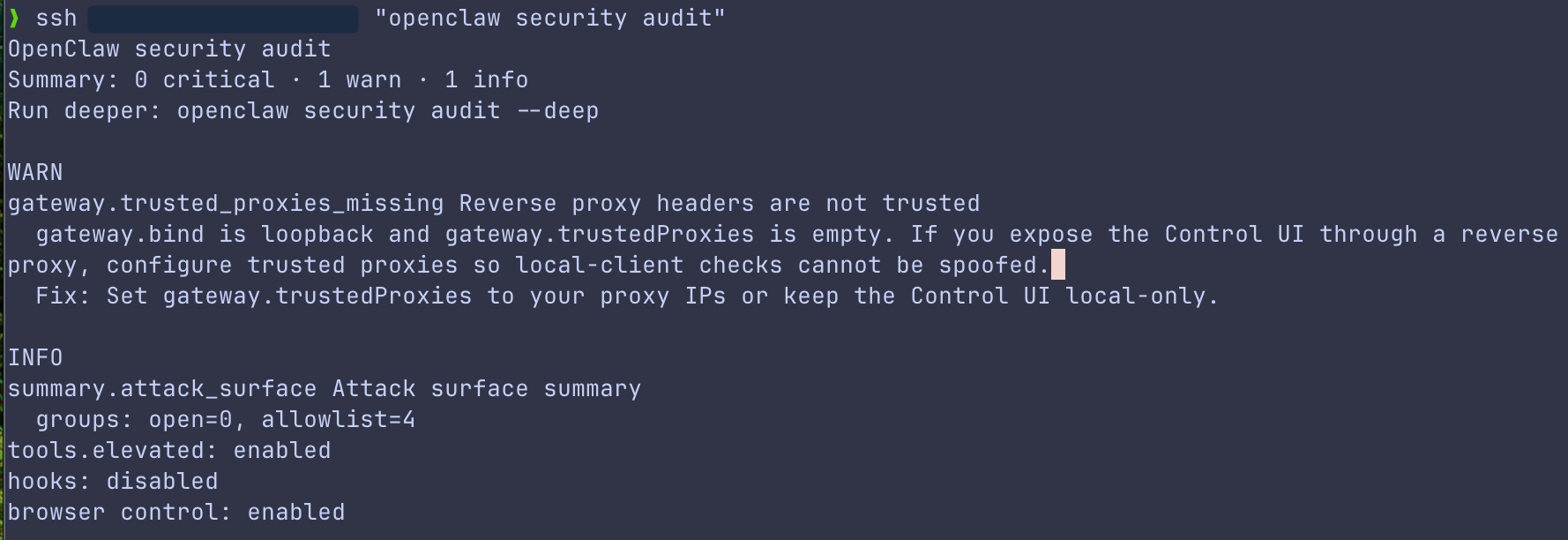
OpenClaw has a built-in audit command (openclaw security audit) that checks your DM policies, tool blast radius, network exposure, and disk hygiene. Run it periodically.
Treat secrets like a first-class problem
Keep secrets out of plain text notes and configs. Rotate tokens on a schedule. If you don’t have a rotation habit yet, your first rotation will happen during an incident - always a bad time to learn a new workflow.
Bottom line
The safe way to run OpenClaw at home is boring: private by default, narrow permissions, approvals for risky actions, logs you check. Keep the checklist short, run it consistently, and it stays useful without becoming a permanent worry.
Further reading
- https://openclaw.ai/docs/security
- https://genai.owasp.org/llm-top-10/ - OWASP Top 10 Risk & Mitigations for LLMs and Gen AI Apps